
Reference · Desktop and system
Assistants and automation
Scripts and AI helpers act through the same `wol` commands as people, behind an approval gate.
On this page
What it is
AI helpers (over MCP) and scripts change WolOS only through the wol command tree. Reads run; changes ask on screen; administrator actions ask for the password every time. Everything lands in an audit log.
Why
A helper should never be able to do more than you could approve yourself. One gate for every caller means one place to see and revoke what each helper may do.
How
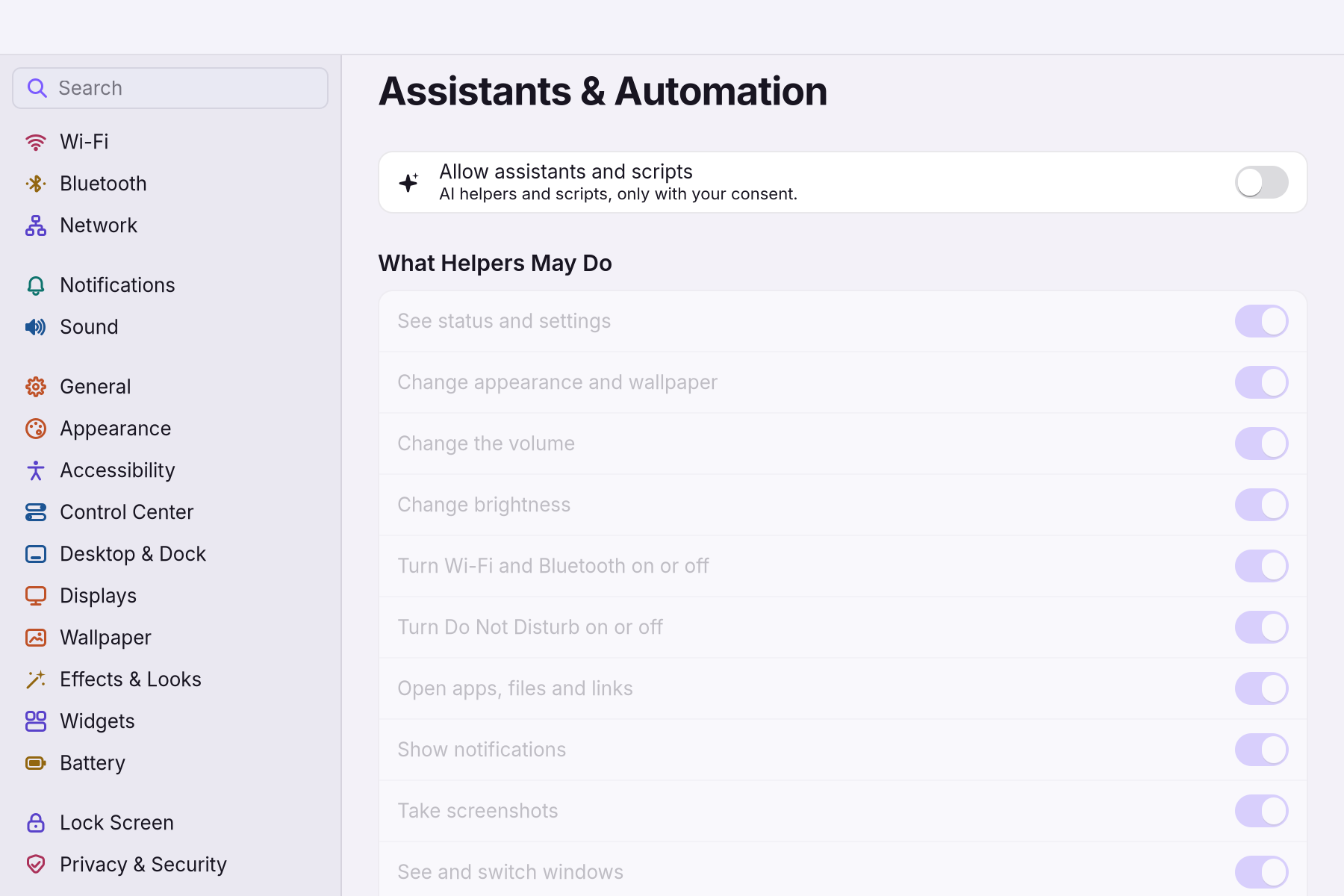
Allow helpers at all. Open Settings > Assistants & Automation and turn on Allow assistants and scripts. It is off until you turn it on. You see What Helpers May Do: one switch per kind of change (see status, change appearance, change the volume, open apps, show notifications, take screenshots and more).
- Connect a helper: point an MCP client at
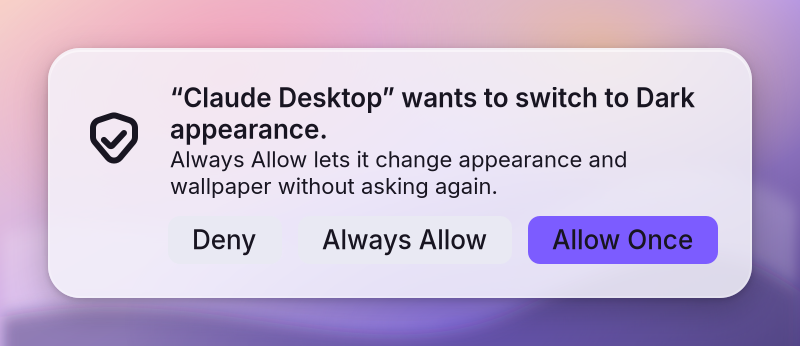
wol mcp, or setWOL_HELPER=<name>for a script. Approve what it asks. A read runs. A change shows a sheet with Deny, Always Allow and Allow Once (focus starts on Deny). An administrator action asks for your password. You see the helper's name and what it wants to do, in plain words.
- Review and revoke: Settings > Assistants & Automation shows each helper and capability; Always Allow is kept per helper and per capability. Settings > Restore lists every change a helper made, with Undo.
If something goes wrong
| What you see | What to do |
|---|---|
| A helper is refused | The gate refused it: reads run, changes ask, administrator actions ask for the password. With no desktop session it says "No WolOS session is showing". |
| An approval timed out | An unanswered sheet times out and refuses; ask again. |
busy | One sheet is on screen and four are waiting; more are refused for now. |
| You want to stop a helper | Turn it off or deny a capability in Settings > Assistants & Automation. |
--help ran something | It cannot: --help on any wol command only shows help. |
Related
The wol command · Privacy and permissions · Optional modules (AI)
Reference
Decision record: ADR 0020 (capabilities, approval, identity from the kernel).
One door for people, scripts and AI helpers: the wol command tree. Helpers never get more than the user could approve on screen.
Who is a helper
| Caller | Name (policy, audit log) | Gate |
|---|---|---|
wol mcp client (MCP over stdio, JSON-RPC 2.0) | its clientInfo.name | yes |
script with WOL_HELPER=<name> | script:<name> | yes |
a person running wol | cli | no (admin verbs ask for the password on stdin) |
Helper verbs: catalog::HELPER_VERBS (wol api --json lists access and capability). Anything else stays for people.
Gate (controller::approve::decide, same for MCP and scripts)
| Step | Rule |
|---|---|
| policy | $XDG_CONFIG_HOME/wolos/helpers.json: off switch, deny per capability; malformed = off |
| read | runs |
change (files tidy without a plan is a dry run = read) | asks on screen unless Always Allow for that helper + capability |
| administrator | asks for the password every time; runs in wol-shell through wol-admind, never in the helper |
no session (no XDG_RUNTIME_DIR / no socket) | refused, "No WolOS session is showing" |
Wire (shared::shell)
Requester -> $XDG_RUNTIME_DIR/wol-shell.sock: approve {"helper","tool","request"}\n, half-close, wait up to APPROVAL_WAIT_SECS (60).
Shell -> one line {"answer": ...}, then close:
| Answer | Meaning | Requester |
|---|---|---|
allow-once | change allowed | runs it |
allow-always | change allowed; shell saved the grant (journaled) | runs it |
done | admin change ran after the password | reports success |
failed + message | admin change allowed but failed | error |
deny | user said no | nothing changes |
timed-out | no answer within APPROVAL_TIMEOUT_SECS (50, from arrival; MCP clients time out at 60) | nothing changes |
busy | 1 on screen + 4 waiting already | nothing changes |
| empty / other | old shell or a wrong answer for the request | refused; an admin request never runs in the helper |
Approval sheet (crates/shell/src/ui/approval.rs)
- Kit AuthSheet on one glass panel: "“<helper>” wants to <what>." in plain words (
catalog::describe). - Change: Deny, Always Allow, Allow Once; focus starts on Deny (a stray Enter or Space never says yes).
- Admin: password field, Deny, Allow; a wrong password asks again.
- Esc or closing = Deny. Queue: one on screen, 4 waiting, more get
busy.
Desktop toggles (wol toggle <word> [on|off], wol_core::toggles)
What a toggle is: one switch the menu bar, Control Center tiles, hotkeys and helpers share. Why one
verb: a toggle can touch the display, idle and notifications at once, which no single capability
covers. How: wol toggle <word> flips it, wol toggle <word> on|off sets it, wol toggle (or
wol toggle list [--json]) lists every toggle with its state. Helpers may only list them
(toggle list, Read); flipping stays for people, hotkeys and tiles. State is one flag file per toggle
under $XDG_STATE_HOME/wolos/toggles/org.wolos.<id> (Do Not Disturb: the wol/dnd file in the
config home, which the notification code and wol focus read).
| Word (aliases) | Toggle | What it flips |
|---|---|---|
nightlight (night-light, nightshift, night-shift) | Night Light | warmer colours: hyprctl hyprsunset temperature at NIGHT_LIGHT_KELVIN, off = identity; without hyprsunset the change stops |
stay-awake (idle, awake, caffeine) | Stay Awake | the screen does not dim, lock or sleep by itself: a systemd-inhibit --what=idle held by the user unit wol-stay-awake.service, which off stops |
silence (dnd, focus) | Do Not Disturb | banners wait in the Notification Center: only the flag file changes |
Invariants
- One audit record per helper call (
$XDG_STATE_HOME/wolos/actions.jsonl), written by the requester; the shell writes one only for an admin change it ran after the requester left. Passwords are never logged. - Always Allow is per helper and capability. An MCP helper is its declared name plus the program that started
wol mcp, read from the kernel through a pinned/procdirectory (Assistant (/usr/bin/assistant)), so another program that copies the name is asked again (audit C10-6). Changes that leave something behind (webapp add|remove,modules enable,sessions save|restore) are asked every time and offer no Always Allow (C10-1);wol helpers deny <cap>andwol helpers forget <helper>take it back; it is a journaledhelperschange a helper cannot undo. - Helper names are what the helper says it is and helpers run as the user: the gate keeps well-behaved helpers inside what the user approved; it is not a sandbox.
- Tests:
crates/controller/tests/{mcp,helpers,approval_socket}.rs(fake shell on a real socket), goldensapproval,approval-admin.
Related
- Plugin API referenceThe complete manifest, permissions and Lua API for shell plugins.
- The wol commandEvery wol command, what it does, and which ones helpers may call.
- 0031: Plugins, themes and layoutsFolder plugins in a sandbox, themes for every toolkit, and layouts as data.
- Optional modulesAI, developer, creative and console stacks, installed after the base and removable.
- Scripts: sh, bash and RubyCheck and run a shell or Ruby script the same way, as you, through the same approval gate as every helper.
From the developer documentation, wonderlandos/wolos docs/modules/automation.md.