
Reference · Desktop and system
Hardware and drivers
One catalogue decides the driver, firmware and options for each device.
On this page
What it is
A single table inside WolOS maps each device (by bus, vendor and id) to its Linux driver, kernel modules, firmware packages and options. Boot, Settings and the wol hw command all read that same table.
Why
Driver choice spread over shell scripts drifts and breaks quietly. One tested table means a device behaves the same at install, at every boot and when a disk moves to another computer.
How
- Open Settings > Hardware to see every device with its state. A device that needs something has a Fix button; Fix installs what is missing and nothing else.
- Or list your devices in Terminal:
wol hw. You see each device with its driver and a state: ready, needs-driver, needs-firmware or unsupported. - See only the problems:
wol hw status. You see the devices that need something, each with the fix. - Apply the fix:
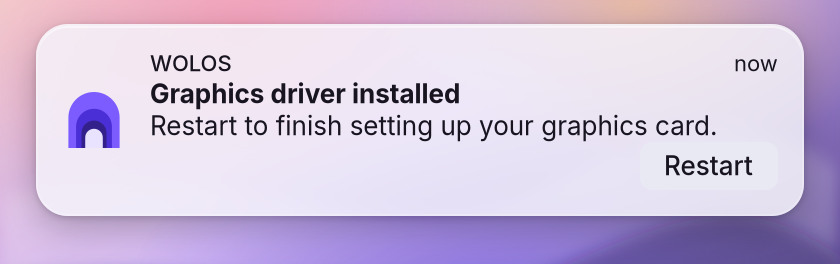
wol hw fixloads missing drivers (administrator password);wol hw fix --yesalso installs the missing packages. NVIDIA cards: the drivers are installed online at first boot, so connect to a network for the first start. When the driver is in, a notification asks you to restart.
If something goes wrong
| What you see | What to do |
|---|---|
A device is needs-driver | The module is not loaded or its package is missing: wol hw fix loads it (administrator); wol hw fix --yes also installs packages. |
A device is needs-firmware | The firmware package is missing: wol hw fix --yes. |
A device is unsupported | The module is not in this kernel or the row is marked unsupported; the one-line note says why. |
| NVIDIA graphics missing after install | The drivers are installed online at first boot. Connect to a network and restart, or run wol hw fix --yes. |
| No graphics device for a game | wol hw status lists problems only and the fix. |
Related
Games · Optional modules (Local AI) · Recovery
Reference
Decision record: ADR 0016 (Arch base; firmware from Arch packages).
One catalogue (crates/core/src/hardware/catalog.rs) decides, per device, the Linux driver, kernel modules, Arch firmware/driver packages and modprobe options. Boot, wol hw and helpers read the same table; no shell scripts pick drivers.
Detection (wol_core::hardware::read, Host trait, 2 s per command, never a shell)
| Source | Gives |
|---|---|
/sys/bus/pci/devices/*/{vendor,device,class}, driver link | PCI ids, class, bound driver |
lspci -mm (optional) | PCI device names |
/sys/bus/usb/devices/* (idVendor, idProduct, bDevice*, interfaces bInterface* + driver) | USB ids, interface classes, drivers (readable without root) |
/sys/bus/acpi/devices/*/modalias | ACPI _HID/_CID (I2C HID PNP0C50, AMD I2C) |
/sys/class/backlight | backlights |
/proc/modules, /usr/lib/modules/<release>/modules.{dep,builtin} | loaded and available modules (built-ins count as loaded) |
pacman -Qq | installed packages |
/proc/cpuinfo, cpu0/cpufreq/scaling_driver | CPU vendor and model, cpufreq driver |
Matching: bus, vendor, device range, class prefix. Narrowest matching range wins, then a named vendor over any vendor, then the longest class prefix; ties go to the earlier row. Module names compare with - and _ alike.
States (shared::hardware, snapshot file)
| State | When | Hint |
|---|---|---|
| ready | driver bound, firmware and packages present | - |
| needs-driver | module not loaded, or its package missing | wol hw fix / wol hw fix --yes |
| needs-firmware | firmware package missing | wol hw fix --yes |
| unsupported | module not in this kernel, or row marked | one-line note |
CLI
| Command | Does |
|---|---|
wol hw, wol hw list [--json] | every device: kind, name, driver, state (table on a tty, JSON otherwise) |
wol hw status [--json] | problems only and the fix |
wol hw fix [--yes] | modprobe via wol-admind hw-load (catalogue modules only); packages via pkg-install only with --yes |
wol hw boot [--online] | boot service only (root); --online on first boot: pacman -S --needed --noconfirm the missing catalogue packages first |
wol sys hw | same devices as wol hw list --json (System API topic, cached 30 s) |
Boot (wolos-hw.service, every boot: a disk moves between machines)
udev autoloads most drivers before; its loads count as loaded.
| Step | Action |
|---|---|
| packages | --online only: install what the catalogue lists as missing (NVIDIA), then re-read the hardware |
| options | /etc/modprobe.d/wolos-hw.conf: options lines (nvidia_drm modeset=1 fbdev=1), written before any load |
| boot list | /etc/modules-load.d/wolos-hw.conf: catalogue modules of the supported devices present |
| modules | modprobe each missing catalogue module now |
| snapshot | written for wol hw and Settings |
Written files start with a WolOS header. Unchanged files are not rewritten. Always exits 0. Microcode (intel-ucode/amd-ucode) loads from the initramfs.
NVIDIA
| GPU (PCI device) | Driver | Packages |
|---|---|---|
| Turing and newer (0x1e00+) | nvidia open modules (nvidia, nvidia_modeset, nvidia_drm, nvidia_uvm) | nvidia-open, nvidia-utils (installed online at first boot if missing) |
| older | nouveau | linux-firmware-nvidia |
Session environment (GBM, GLX vendor, VA-API, PRIME offload): crates/realtime/src/gpu_env.rs.
Tests: crates/core/src/hardware/tests.rs, crates/controller/tests/hw.rs.
Related
- GamesNative Steam with Proton, and Windows programs outside Steam on Wine.
- The wol commandEvery wol command, what it does, and which ones helpers may call.
- Optional modulesAI, developer, creative and console stacks, installed after the base and removable.
- 0032: Optional modulesAI, developer, creative and console stacks as removable modules and Kits.
- SecurityFirewall, hardening, daily update checks, a first-use malware check and disk encryption.
From the developer documentation, wonderlandos/wolos docs/modules/hardware.md.