
Reference · Desktop and system
Power and sleep
The power source picks the profile; Low Power and High Power Mode override it.
On this page
What it is
WolOS chooses an energy profile, Wi-Fi power saving, screen-off and sleep times from whether the computer is plugged in. Low Power Mode and High Power Mode override the choice until you switch back to Auto. Memory Saver, in the same pane, lets apps you are not using give their memory back; they get it back the moment you return. Think of a car that switches to economy on the motorway and back to sport when you need it, without you touching the gear lever.
Why
Most people never open power settings. A laptop on battery should last, and the same laptop on the desk should be fast, without anyone choosing that twice a day.
How
- Do nothing for the usual case. Automatic follows the power source: balanced on AC and on battery, with Wi-Fi power saving and shorter screen-off and sleep times on battery.
Open Settings > Battery to see the charge, the battery's health and the energy choices. You see Battery level, Battery health and Charge cycles, then Energy Mode and what happens when the lid is closed, then Memory Saver and App Nap.
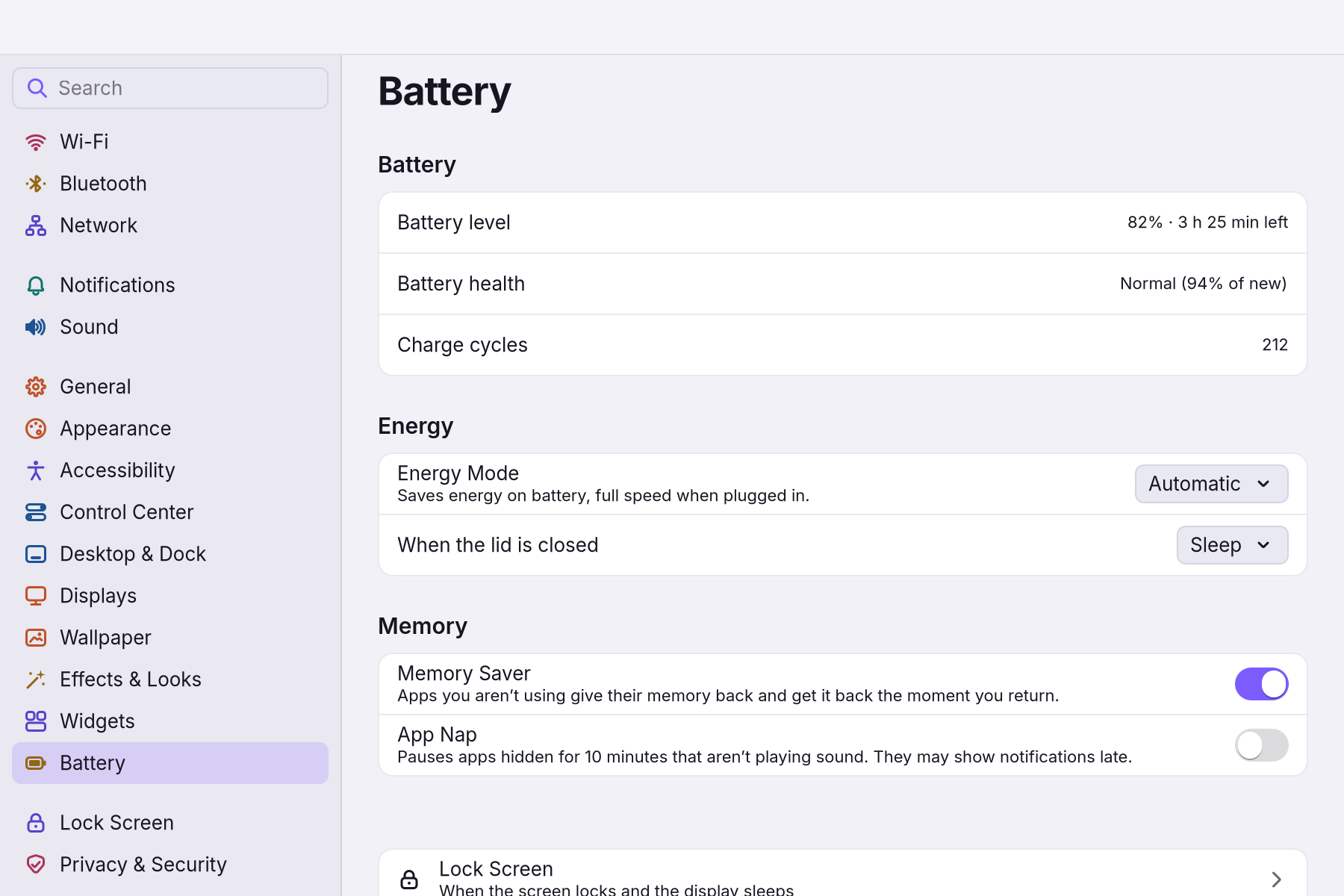
- To force a mode, choose it in Energy Mode, or run
wol power mode low(saves energy) orwol power mode high(fastest).wol power mode autogoes back. You seewol power statusprint the power source, the mode and what the policy sets. - Sleep always locks first. Battery warnings come at 20, 10 and 5 %, and at 3 % the computer sleeps on its own.
If something goes wrong
| What you see | What to do |
|---|---|
| The laptop does not sleep or wake with a lock | Every sleep locks first. A session that does not answer within 3 seconds does not hold the sleep. |
| Battery warnings | They come at 20, 10 and 5 %; at 3 % the computer sleeps on its own. |
| Restart or Shut Down asks for a password | Another account has a session. The account at the computer needs no password otherwise. |
| The mode switch is missing | The profile daemon is not running, so nothing steers the CPU and the switch hides. |
| Wi-Fi feels slow on battery | Wi-Fi power saving is on in Auto on battery and Low; choose High Power Mode. |
| Disk nearly full | Under 5 % free the shell shows one notification until space is back. |
Related
Settings > Battery · Control Center · Performance budgets
Reference
The power source picks the profile; Low Power and High Power Mode override it (ADR 0014).
Code: wol_core::power::policy (pure: facts from read-only probes in, fixed argv out).
wol power apply runs the plan; udev runs it on AC changes, systemd at boot and resume, wol-admind power-mode after a mode change.
| Mechanism | AC (Auto) | Battery (Auto) | Low | High | Where |
|---|---|---|---|---|---|
| Energy profile | balanced | balanced (CPU prefers efficiency on battery) | power-saver | performance | powerprofilesctl set; switched only when it differs |
| Wi-Fi power save | off | on | on (battery) | off | iw dev <if> set power_save, interfaces that answer get power_save |
| Display off when idle | lock time + 1 min | 2 min | hypridle (prefs::hypridle_conf, system hypridle.conf) | ||
| Sleep when idle | never | 10 min | hypridle -> wol power idle sleep (needs mem in /sys/power/state) | ||
| Lid closed | suspend | suspend | logind; wol-admind lid writes /etc/systemd/logind.conf.d/50-wolos-lid.conf |
power-profiles-daemon drives the CPU energy preference (intel_pstate, amd-pstate-epp) and the ACPI platform profile. Without it nothing steers the CPU and the switch hides. The mode is saved in /etc/wolos/power.json.
Probes: nproc, powerprofilesctl get, ls/cat under /sys/class/power_supply, /proc/acpi/button/lid, /sys/power/state, /sys/class/net/*/wireless, iw. Entry names reach argv only when plain ([A-Za-z0-9_.:-], no leading -).
Not offered yet: a battery charge limit (charge_control_end_threshold).
Kernel settings wol-admind may change go to /etc/sysctl.d/99-wolos-local.conf (power::SYSCTL_LOCAL; none are allowed yet). The name sorts after the shipped 90-wolos.conf, so a local value wins; CI image_security local_sysctl_sorts_after_the_shipped_defaults.
Sleep, alerts, session power
- Every sleep path locks first. The systemd-sleep hook calls
wol power suspend, which locks each session that asks for the password after sleep. It waits at most 3 s for each shell (power::LOCK_WAIT_SECS), so one hung session does not hold the sleep. - Battery notifications at 20, 10 and 5 %. At 3 % the computer sleeps (
shell::alerts). - When the startup disk is under 5 % free, the shell shows one notification until space is back.
- Sleep, Restart and Shut Down go through wol-admind
session-power(systemctl suspend|reboot|poweroff).- The account at the computer needs no password. Restart and Shut Down ask for one while another account has a session.
- Restart, Shut Down and Log Out ask first, with a 60 s countdown.
Commands
wol power status|apply|mode [auto|low|high]|sleep|restart|shutdown|idle display-off|sleep [--json].
Needs hardware
- Suspend and the lock before it.
- power-profiles-daemon profiles on a real laptop.
- Wi-Fi power save on iwlwifi/rtw88.
- udev power_supply change events.
Tests cover the plans with fixtures, not these effects.
Related
- The wol commandEvery wol command, what it does, and which ones helpers may call.
- Plugin API referenceThe complete manifest, permissions and Lua API for shell plugins.
- libwol: the app APIOne stable C ABI for apps in any language: windows, menus, notifications, files, power and more.
- Performance budgetsIdle cost and response times of the desktop, with targets and measurements.
- Assistants and automationScripts and AI helpers act through the same `wol` commands as people, behind an approval gate.
From the developer documentation, wonderlandos/wolos docs/modules/power.md.