
Reference · Desktop and system
Optional modules
AI, developer, creative and console stacks, installed after the base and removable.
On this page
- What it is
- Why
- How
- If something goes wrong
- Related
- Reference
- Registry (/usr/share/wolos/modules/<id>.json, wol_core::modules)
- State
- CLI (crates/controller/src/modules.rs)
- GPU backend (controller::hw::pick_gpu)
- Packages and the root side (wolos-pkgbuilds, files/usr/lib/wolos/modules-install)
- Agents (ai-claude)
- Sessions (wol_core::sessions, crates/controller/src/sessions.rs, crates/shell/src/sessions.rs)
- Console (desktop/overlay)
- Recipes (wopkg/recipes/, ADR 0021)
- Invariants
What it is
A module is one package that brings a whole set of tools: AI assistants with WolOS's approval gate, local models, developer tools, saved sessions, creative apps, gaming tools, or a richer console. None is pre-ticked; each can be removed again, and removing one also removes what it added. Think of the apps that come with a new phone and the extra packs you can add later: the phone stays light, and a pack is one tap to add and one to remove.
Why
The base image stays small and installs offline. People who code or create get their tools in one approval; everyone else never downloads them.
How
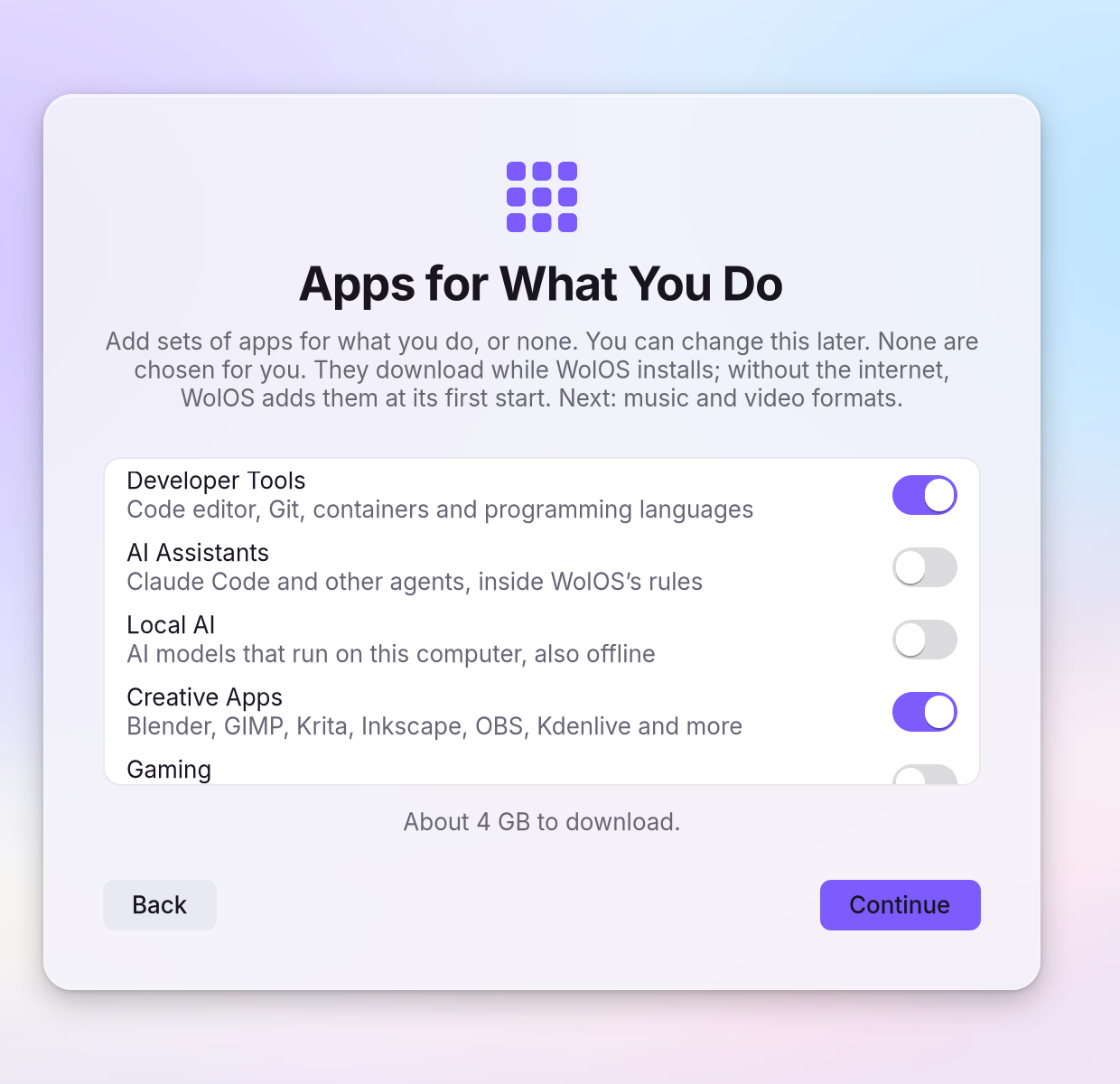
While you install, tick the modules you want on the page Apps for What You Do. The installer offers five: Developer Tools, AI Assistants, Local AI, Creative Apps and Gaming.
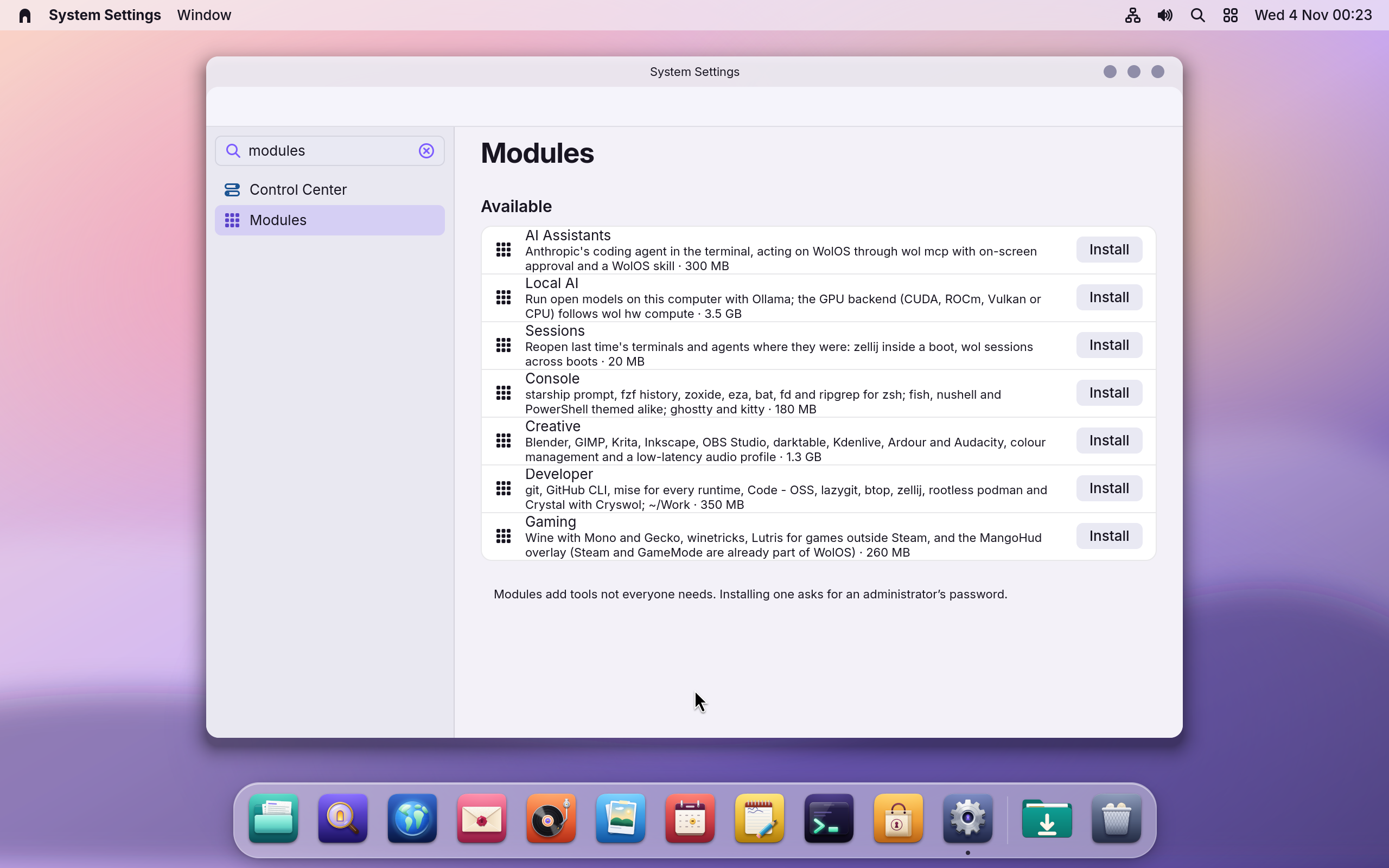
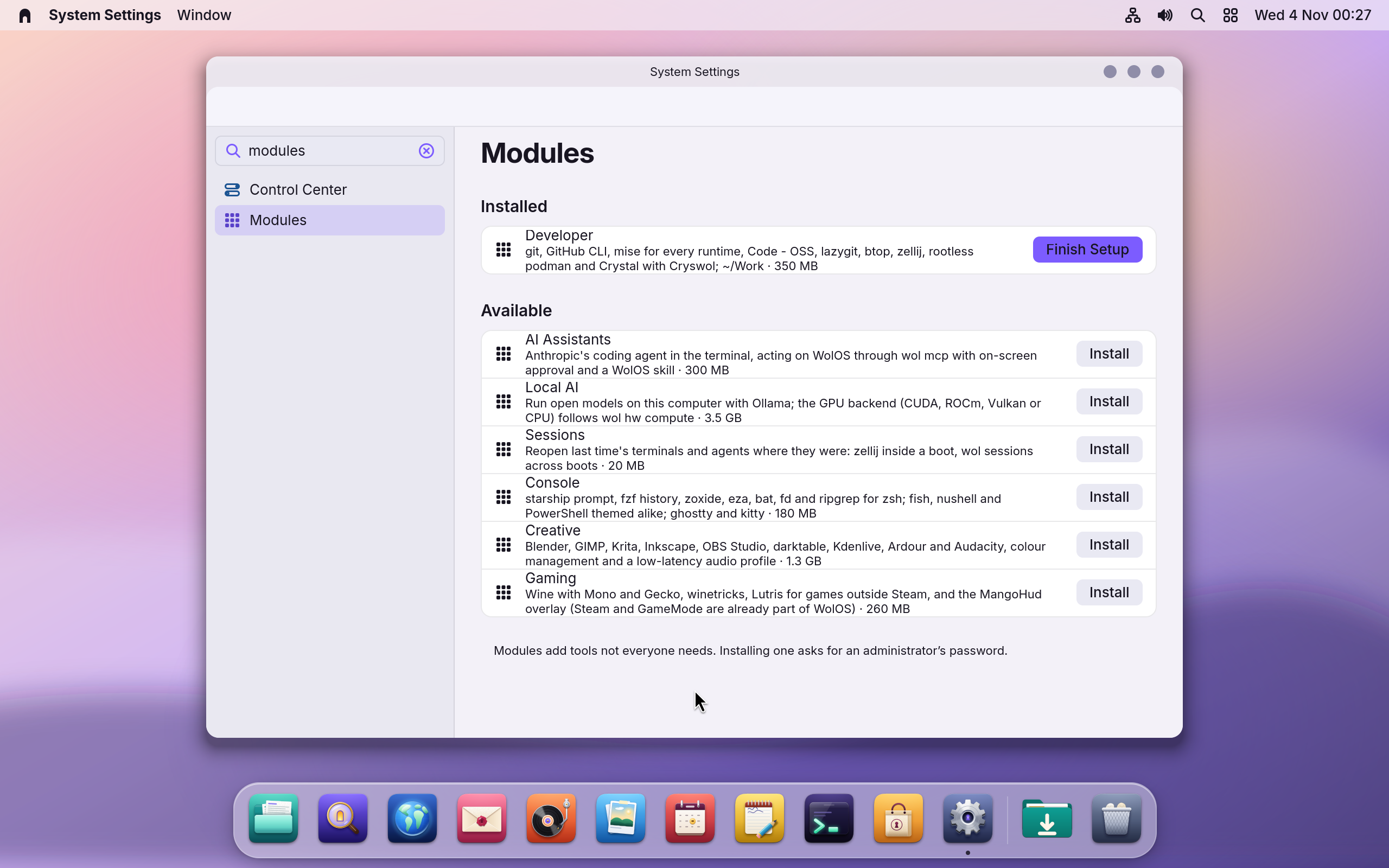
Later, open Settings > Modules. It lists all seven, with Install for each one you do not have. Installing asks for an administrator's password, then runs the part that belongs to your account. You see the module under Installed with Ready, or Finish Setup when your part has not run yet.
- From a terminal:
wol modules list,wol modules install <id>(asks for the administrator password), thenwol modules enable <id>for the part that is yours alone. - Offline, the installer remembers what you ticked and the first start with a network installs it in the background, without asking for the password again. A module that cannot be downloaded after five tries is listed under Could Not Be Added with Retry.
The Store's Kits page is separate: it holds Media Codecs (Music and video formats).
| Module (id) | What it brings | Download | Needs |
|---|---|---|---|
Developer (dev) | git, GitHub CLI, mise for every runtime, Code - OSS, lazygit, btop, zellij, rootless podman, and Crystal with Cryswol; a ~/Work folder. See Set up for development | about 350 MB | network |
AI Assistants (ai-claude) | A coding agent in the terminal, acting on WolOS through wol mcp with on-screen approval, WolOS managed settings (wol mcp allowed; sudo and friends denied) and a WolOS skill for writing and checking plugins | about 300 MB | network, an account with the agent's provider |
Local AI (ai-local) | Open models on this computer with Ollama; the GPU backend (CUDA, ROCm, Vulkan or CPU) is chosen for your machine (wol hw compute) | up to about 3.5 GB, by graphics card | network |
Sessions (ai-sessions) | Terminals and agents reopen where they were: wol sessions save, restore, list; a notification offers it once at login, and an empty desktop never overwrites a saved set unless you ask | about 20 MB | nothing; installable offline |
Creative (creative) | Blender, GIMP, Krita, Inkscape, OBS Studio, darktable, Kdenlive, Ardour and Audacity, colour management and a low-latency audio profile. See Creative apps in one step | about 1.3 GB | network |
Gaming (gaming) | Wine with Mono and Gecko, winetricks, Lutris and the MangoHud overlay (Steam and GameMode are already part of WolOS). See Steam and your game library | about 260 MB | network |
Console (console) | A themed prompt, pickers for files, commits and variables, faster folder jumping and listing, the same keys and colours in every shell (zsh, fish, nushell, PowerShell), ghostty and kitty, and system defaults for the terminal multiplexer and the tool version manager | about 180 MB | network |
If something goes wrong
| What you see | What to do |
|---|---|
| "Installs when this computer next starts online." | Ticked in the installer but offline. It installs by itself when the network comes up, on Wi-Fi too. |
| "This module couldn't be downloaded after several tries." | It was given up after five tries instead of being retried at every start. Check you are online, then try again from Settings > Modules > Could Not Be Added. |
| Modules shows a message instead of "No modules are available" | The list could not be read. Try again; a list that cannot be read now says so. |
| A module installed but not set up | Run wol modules enable <id> (as yourself). wol modules status <id> shows installed, enabled, pending or available. |
| Removing a module | Settings > Modules, or wol modules remove <id>; it also removes what it added. |
| Local AI is slow | The GPU backend follows your machine (wol hw compute prints cuda, rocm, vulkan or cpu). A virtual GPU runs on the CPU. |
| An AI assistant asks about sudo | The managed settings allow wol mcp and deny sudo, su, pkexec, run0 and doas. |
Related
The Store · Installing WolOS · Assistants and automation · Settings
Reference
ADR 0032. The base stays small; AI, developer, creative and console stacks are installed after it, never pre-ticked, each removable. A module is one meta package wolos-module-<id> (wolos-pkgbuilds) whose depends= names snapshot-pinned Arch and [wolos] packages, plus one registry record. Anything outside Arch (Claude Code, PowerShell) is installed user-side by the module's enable step through wopkg recipes or mise, so the sealed system stays sealed and no root is needed for it.
Registry (/usr/share/wolos/modules/<id>.json, wol_core::modules)
| Field | Meaning |
|---|---|
id | [a-z][a-z0-9-]{0,31}, equals the file stem and the package suffix |
name, summary, icon, category | shown by the installer and Settings > Modules (the Store's Kits shelf lists only the Kits of wol_core::store::KITS, Media Codecs and Craft Suite, not modules); icon is a name the WolOS icon theme draws (design/icons/symbolic, an app icon or an alias; crates/controller/tests/rules_system.rs checks it); category ai, developer, creative, gaming or console |
size_mb | the download in MiB (as pacman's Total Download Size) rounded up to the next 10, shown as "N MB" by the installer, Settings > Modules and wol modules status: the meta package's dependencies a fresh slot lacks, plus its recipes, plus for a record with a backend the largest variant (ai-local: 20 for CPU, 30 for Vulkan, 3300 for CUDA, 3470 for ROCm, so 3470; per-backend sizes come after v0.12); measured, not guessed (crates/controller/tests/module_sizes.rs recomputes it with WOLOS_REPO_DB) |
packages | what the meta package depends on (documentation here; pacman decides) |
recipes, mise, flatpaks | user-side parts enable installs (wopkg install, mise use -g, flatpak install --user) |
post | argv run as the user by enable, idempotent; a script under /usr/lib/wolos/ |
offline | installable from the ISO without network |
needs | words for the UI: network, anthropic-account, ... |
backend | optional package stem with one variant per GPU backend (ollama for ai-local): <backend>-cuda|rocm|vulkan, installed with the meta package on the root side (Module::backend_package), never a depends=; none for cpu |
Records this release ships: ai-claude, ai-local, ai-sessions, dev, creative, gaming, console (files/usr/share/wolos/modules/, wol_core::modules::IDS; crates/controller/tests/modules.rs checks them). dev also carries the WolOS userland language: crystal and pkgconf (Arch) and the [wolos] packages libwol and cryswol, the only [wolos] dependencies of any module (wolos-pkgbuilds/checks/tests/modules.rs); Cryswol programs need it on an installed system (docs/modules/cryswol.md). Not in v0.12 (ADR 0032, planned for 0.13): the codecs record and wol jail run, the agent workspace jail.
State
| Fact | Source |
|---|---|
| installed | pacman -Qq lists wolos-module-<id> |
| enabled | $XDG_STATE_HOME/wolos/modules.json = {"enabled": ["dev"]}, per user, written by enable, cleared by remove; malformed = nothing enabled |
| pending | /var/lib/wolos/modules-pending (override WOL_MODULES_PENDING), one id per line: ticked in the installer but not installable then (offline: --queue; or the download failed) |
| packages pending | /var/lib/wolos/packages-pending (override WOL_PACKAGES_PENDING), one package name per line (store::is_pkg_name, never an option): the media formats ticked in the installer (--package NAME), queued and drained the same way (--queue queues, a name that installs or is given up on leaves the file, a line that is not a package name is dropped), in one transaction after the modules; each name has its own tries and gave-up line (p NAME) |
| tries | /var/lib/wolos/modules-attempts (override WOL_MODULES_ATTEMPTS), lines KIND NAME TRIES, KIND m (module id) or p (package): one more per failed install, the line goes when it installs; queued with --queue is not a try |
| gave up | /var/lib/wolos/modules-gave-up (override WOL_MODULES_GAVE_UP; wol_core::modules::GAVE_UP_FILE), lines KIND NAME: after WOLOS_MODULES_TRIES failed tries (default 5) the name leaves its pending file and is listed here, for Settings > Modules ("Could Not Be Added") to offer again. It leaves the list when modules-install installs it, when modules-install is asked for it by name (tries start again), and when wol-admind completes a pkg-install of it (m ID for wolos-module-<ID>, else p NAME): Settings > Modules Install and Retry, wol modules install and the Store all go that way |
Draining: firstboot starts modules-install --drain in its own transient unit (wolos-modules-pending, so gigabytes never hold up the login window) when either pending file is non-empty, and the network-up hook (/etc/NetworkManager/dispatcher.d/50-wolos-online) drains again on every connection that has a default route (not the loopback device, which comes up first on every boot: its drain could download nothing and would hold the unit's name while the real connection came up, whose start was then refused). Both start the unit with --collect and SuccessExitStatus=1: a transient unit that ends failed stays loaded and keeps its name, so without them the first drain that left something queued (exit 1) would make every later start fail with "unit already exists" until a reboot. firstboot-done is written once the drivers are in; it no longer waits for the queue (a module that never installs would otherwise rerun the whole first boot). A drain removes what installed and keeps the rest. Giving up writes one journal line (tag wolos-modules): gave up on module <id> after 5 tries; to try again: wol modules install <id> (a package: gave up on package <name> after 5 tries; to try again: wol pkg -- -S <name>). On the running system the download step uses a temporary copy of pacman's database (WOLOS_PACMAN_DB, else pacman-conf DBPath, under $TMPDIR, default /var/tmp): a sealed slot's own database cannot be locked; the install itself is the plain pacman -Sy through the wrapper (a layer). Both refresh the repo lists (-Syw, -Sy): a system installed offline has none (install-run refreshes only online) and an older list names files the mirror no longer has, so a plain -S would never find the module. Into the installer's target (--root) there is no refresh: install-run did it when it was online.
Status::state() is one word: enabled (installed and the user step ran), installed (needs enable, or has no user step), pending, available.
CLI (crates/controller/src/modules.rs)
| Command | Access | Does |
|---|---|---|
wol modules, wol modules list [--json] | Read (read) | every record with its state; JSON = Vec<Status> |
wol modules status [id] [--json] | Read (read) | one module (packages, recipes, needs, download), or the list |
wol modules install <id> | Admin (modules) | wol-admind pkg-install wolos-module-<id> and, for a record with a backend, pkg-install <backend>-<gpu> (the administrator password as for wol restore activate); then says wol modules enable <id> when the module has a user step. Settings > Modules Install and Retry do the same two installs (Status::backend, in wol modules list --json, names the package for this machine; the backend goes first, so a failed backend leaves the module not installed and Retry on offer), then run enable |
wol modules remove <id> | Admin (modules) | wol-admind pkg-remove wolos-module-<id>, then wopkg remove each recipe and drops the enablement |
wol modules enable <id> | Change (apps) | as the user: recipes, mise tools, Flatpaks, then post; recorded only when every step passed; repeatable |
wol hw compute [--json] | Read (read) | {"backend": "cuda|rocm|vulkan|cpu", "vram_mb": n, "gpu": "name"} for the local-AI module |
Helpers (wol mcp, scripts) get list, status, enable and hw compute through the usual gate (docs/modules/automation.md). install and remove join catalog::HELPER_VERBS once shared::shell::ApprovalRequest has a Module variant the shell runs; until then only people run them. Tests: WOL_MODULES_DIR and WOL_MODULES_PENDING point the verbs at a fake registry and pending file.
GPU backend (controller::hw::pick_gpu)
The hardware catalogue already decides the driver; the backend follows it: nvidia modules (Turing and newer) = cuda (ollama-cuda), amdgpu on Vega or newer = rocm (ollama-rocm), amdgpu on GCN 1-4 (PCI device ranges in AMD_PRE_VEGA), i915, xe, nouveau, radeon = vulkan (ollama-vulkan), a virtual GPU or none = cpu. With several GPUs the discrete one wins (cuda > rocm > vulkan). VRAM: nvidia-smi --query-gpu=memory.total for NVIDIA, /sys/bus/pci/devices/<addr>/mem_info_vram_total for amdgpu, else 0. ai-local depends on ollama only; its record's backend (ollama) names the per-machine part, which is installed on the root side together with the meta package: files/usr/lib/wolos/modules-install (installer, firstboot) and wol modules install. So enable never asks for the administrator password; its post (/usr/lib/wolos/ai-local) only checks the backend and says when models will run on the processor.
Packages and the root side (wolos-pkgbuilds, files/usr/lib/wolos/modules-install)
Each record has a meta package wolos-module-<id>/ in wolos-pkgbuilds: arch=(any), no sources, depends= = wolos-system + the record's packages, built with --nodeps (build.conf); checks/tests/modules.rs keeps the two equal and, with --ignored, checks every dependency exists at the snapshot. The records, the scripts and the drop-ins below ship in wolos-system, so a module is listed before it is installed; the one exception is Claude Code's managed settings, which only the module package installs (next section). modules-install [--root DIR] [--drain] [--queue] ID... is the one root helper: bounded download, install from the cache, the record's backend added; it keeps the pending file as queued minus installed (exit 0 all installed, 1 some queued, 2 bad id). install-run calls it with --root (offline: --queue), firstboot with --drain.
Agents (ai-claude)
/etc/claude-code/managed-settings.json (written by wolos-module-ai-claude's package(), backup= so a local edit survives; not in wolos-system, so a machine without the module has no Claude Code policy; checks/tests/modules_files.rs in wolos-pkgbuilds checks both) allows the mcp__wolos tools (WolOS's own gate asks, so Claude does not ask twice), denies sudo, su, pkexec, run0 and doas, and keeps Claude Code on its stable channel; it sets no server allow-list, so people keep their own MCP servers. enable registers wol mcp and links the WolOS skill (/usr/share/wolos/agents/skills/wolos/SKILL.md: the verb tree, the gate's answers, writing and checking a plugin) into ~/.claude/skills and ~/.agents/skills.
Sessions (wol_core::sessions, crates/controller/src/sessions.rs, crates/shell/src/sessions.rs)
wol sessions save|restore|list [--json] keeps the terminal and agent windows of a session in $XDG_STATE_HOME/wolos/sessions.json: {version, saved_at, windows: [{workspace, cwd, kind, command, title, terminal}]}, at most 64 windows and 256 KiB. save reads hyprctl -j clients and, below each foot, ghostty or kitty window, /proc (the shell's folder, the foreground program). command is one of "" (the shell), zellij, zellij attach <name>, claude --continue; on restore it is rebuilt into argv from that list, never run as text, the folder must be absolute without .., and each window opens through hyprctl dispatch exec "[workspace N silent] …" with every word single-quoted. With ai-sessions installed the shell offers once per session ("Reopen N windows from last time?", a notification with a Reopen button), before its first save, then saves every 60 s. Helpers (wol mcp, scripts) may call wol sessions list (Read, capability window-list) and wol sessions save / wol sessions restore (Change, capability apps, an approval sheet like wol modules enable).
Console (desktop/overlay)
zsh stays the login shell; its zshrc wires starship, fzf (Ctrl+R, Ctrl+T, and zsh/fzf.zsh: Ctrl+Alt+F files, Ctrl+Alt+L git commits, Ctrl+Alt+V variables), zoxide, eza and bat each only when installed (WOLOS_PROMPT=pure keeps the zsh prompt). fish (/etc/fish/conf.d/wolos.fish), nushell (/usr/share/wolos/nu/autoload, through NU_VENDOR_AUTOLOAD_DIR in /etc/profile.d/wolos-console.sh), bash (/usr/share/wolos/bash/bashrc), PowerShell (/usr/share/wolos/pwsh/profile.ps1) and ghostty (/usr/share/wolos/ghostty/config) get the same history size, keys and prompt. Colours: each reads $XDG_CONFIG_HOME/wolos/toolkits/<file> (wol theme), else the default theme's copy in /usr/share/wolos/toolkits, else its shipped default. /etc/zellij/config.kdl serializes sessions so a named one comes back after a reboot; /etc/mise/config.toml pins mise (lockfile, built-in registry, no asdf, provenance and plugin checks, no trusted project paths, no install on a mistyped command).
Recipes (wopkg/recipes/, ADR 0021)
| Recipe | Source | Checks |
|---|---|---|
claude-code | Anthropic's native linux-x64 binary, stable channel, one pinned version | sha256 of binary, release manifest and its OpenPGP signature; the build step imports Anthropic's release key (fingerprint 31DD DE24 DDFA B679 F42D 7BD2 BAA9 29FF 1A7E CACE, pinned by sha256), verifies the manifest signature, matches the binary checksum against the manifest. Self-updates afterwards (vendor-signed, user-side): Software Update labels it "updates on its own" |
powershell | Microsoft's powershell-<v>-linux-x64.tar.gz (MIT) | sha256 from the release's hashes.sha256; unpacked to ~/.local/lib/powershell, ~/.local/bin/pwsh launcher |
Invariants
- No module on the ISO or pre-ticked; the base does not grow (ADR 0032).
- pacman is the truth for installed; the enablement file never claims a package.
enableruns as the user and never asks for the administrator password;install/removealways do.- A failed user step is not recorded as enabled; running
enableagain is safe (every step idempotent by contract). - Agents reach these verbs only through
wol mcp-> policy -> approval -> audit, like every other verb.
Related
- 0032: Optional modulesAI, developer, creative and console stacks as removable modules and Kits.
- Creatives
- The wol commandEvery wol command, what it does, and which ones helpers may call.
- GamesNative Steam with Proton, and Windows programs outside Steam on Wine.
- SecurityFirewall, hardening, daily update checks, a first-use malware check and disk encryption.
From the developer documentation, wonderlandos/wolos docs/modules/modules.md.