
Everyday
Steam and your game library
Open Steam, sign in and play the games you already own. Windows games run through Steam's own compatibility tool, which Steam keeps up to date.
On this page
What it is
Steam is already on WolOS. You open it like any other app, sign in with your Steam account, and your library is there: the games you bought on Windows are the same games here. Most of them were made for Windows. Steam runs those through its own compatibility tool (The part of Steam that runs Windows games on WolOS.): a translator that sits between a Windows game and WolOS, so the game believes it is on Windows. Think of it as a travel adapter for a plug: the game does not change, the socket does.
Why
Steam's compatibility tool is where the work to make Windows games run happens, every week, for thousands of titles. So WolOS does not add a second layer of its own on top. What WolOS adds is the part that usually goes wrong around Steam: before Steam starts, WolOS checks that the pieces Steam needs are in place (the 32-bit graphics files, the The part of the system that knows how to talk to one kind of device, such as a graphics card or a printer., the matching NVIDIA files) and, when one is missing, tells you in one sentence what to do. You do not read a guide before you can play.
How
Open Steam. Press Super+Space for Search, type
steamand press Return, or click Steam in the The App Store on the desktop: apps picked for you, Kits and plugins, each installed with one click. under Play. You see Steam in Search as an Application. In the Store it sits in the Play list with the line Thousands of games, one library.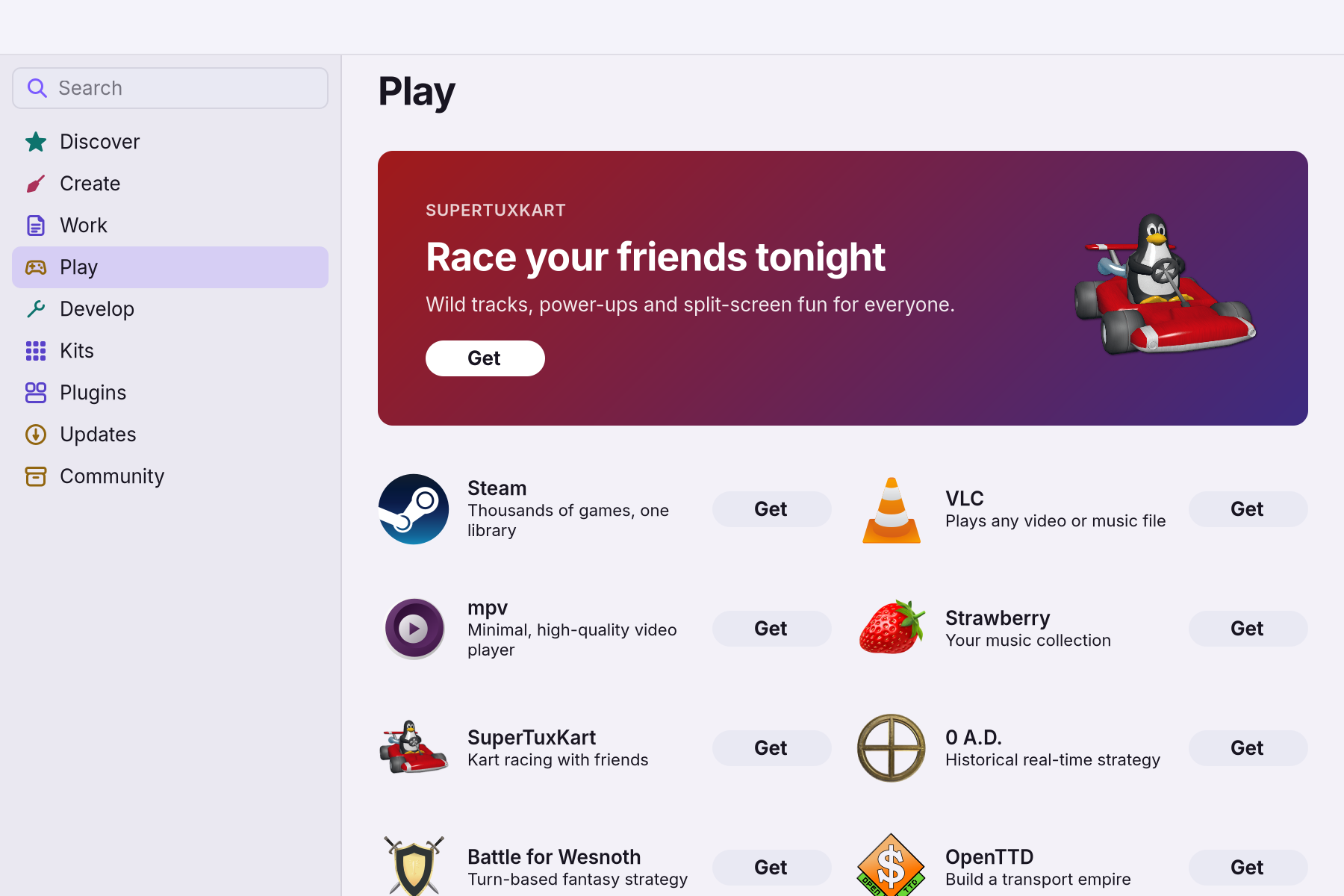
- Wait for the first start. The first time, Steam downloads the rest of itself. You see a notification: Getting Steam ready. Steam downloads itself the first time you open it. It opens when it's ready. Keep the computer online; this happens once.
- Sign in with your Steam account, as you would on Windows. You see your library.
- Install a game from your library and press Play. A game made for Windows runs through the compatibility tool without anything to set. If a Windows game has no Install button, open Steam's Settings > Compatibility and turn on running other titles with the compatibility tool.
Games from outside Steam
A Windows program you downloaded yourself, such as a .exe installer from a game shop, opens with a double-click. WolOS gives each program its own folder of Windows settings, so one program cannot break another. For many such games at once, the An optional set of tools for one kind of work (development, creative work, gaming, AI) that you add or remove in Settings > Modules. adds a games launcher and an on-screen frame-rate counter; see Modules.
On a screen with high resolution
On a sharp laptop screen Steam would look half size. When you start Steam from the Dock, Search or the Store, WolOS tells Steam how large your screen's scale is, so its text is readable.
A worked example
Alice installs Steam from the Store, opens it and waits for the "Getting Steam ready" notification to finish. She signs in with the account she has had for years, finds a game she bought on Windows, clicks Install and then Play. It runs, and she never changed a setting.
If something goes wrong
| What you see | What to do |
|---|---|
| Steam couldn't download | Steam could not fetch the rest of itself. Check that you're online, then open Steam again. |
| Steam can't open yet. Your graphics driver isn't running. | Restart the computer, then open Steam again. If it stays, see Hardware and drivers. |
| Steam can't open yet. Part of Steam is missing. | Run the game check-up: When a game will not start shows the one line to type, and the fix for each missing piece. |
| Steam needs graphics files for your NVIDIA card. | Run the game check-up on When a game will not start; the line marked FAIL has the fix. |
| Steam looks tiny | Start Steam from the Dock, Search or the Store, not from another launcher, so WolOS can pass the screen scale. |
| A game with The core of the system that talks to the hardware and runs every program. WolOS ships its own, WolKernel. anti-cheat will not start | Some online games refuse every system except Windows, because their anti-cheat needs it. That is the game's rule, and its own page usually says so. |
Related
Playing full screen · When a game will not start · Games (reference) · Modules
Related
- When a game will not startOne command checks everything Steam and Windows games need on this computer and prints the exact fix for each missing piece.
- GamesWhich games run on WolOS and where to get them: the Store's Play shelf, Steam with your existing library, Windows games from elsewhere, and the Gaming module.
- Modules: tools for what you doDeveloper tools, AI assistants, creative apps, games and a richer terminal, each added in one step from Settings > Modules and removed in one step.
- Playing full screenWhat WolOS does while a game fills the screen: banners wait, frames go out at once, the refresh rate follows the game, and Force Quit still opens.
- Gamers