
Everyday
Clipboard history
The last 25 things you copied, searchable, with pins for the snippets you paste every day. One-time codes are never kept.
What it is
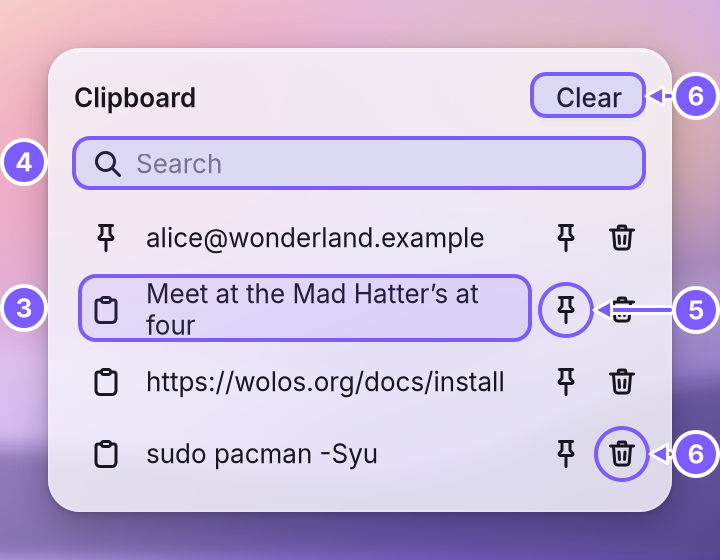
A small panel that remembers the text you copied, so you can paste something from ten minutes ago without finding it again. Open it with Shift+Super+V. It lists your pinned snippets first, then the most recent copies, newest on top.
Why
Copying replaces what you copied before, and the lost text is often the one you need next. A history fixes that, but a history also remembers things it should not. So the panel keeps little and forgets on purpose: it holds 25 recent copies, it never keeps a one-time sign-in code, and the recent list is gone when you log out. Only what you pin stays.
How
- Copy text as usual (Ctrl+C, or Copy in any app). It shows up at the top of the list.
- Open the panel with Shift+Super+V. With nothing copied yet, you see "Copied text shows up here".
- Click a row. Its text goes back on the Where a copied text or picture waits until you paste it. WolOS keeps a history of the last 25 things you copied. and the panel closes. Paste it with Ctrl+V.
- Search by typing in the field: a row matches when it contains every word you type, in any order and any case. When nothing matches, you see "No matches".
- Pin a row with its pin button. Pinned rows stay at the top, survive Clear, and come back after a restart. Its tooltip then reads Unpin. You can pin up to 25.
- Remove a single row with its remove button, or press Clear to drop every recent copy at once. Pinned rows stay until you unpin them.
What is not kept:
- One-time codes. Four to eight digits, maybe split by one space or dash, as banks and sign-in pages send them. They paste once and never enter the history. A A short message from an app or from WolOS. It shows for a moment as a banner at the top right, then waits in Notification Center. that carries a code offers Copy Code; its tooltip says "Copies the code. Clipboard history skips it, and it is cleared after a minute."
- Very long text. A copy longer than 64 KB still pastes; it is just not listed.
- Blank text and an exact repeat of the newest entry.
Where it lives: recent copies only in memory, until you log out or the desktop restarts. Pins in ~/.local/state/wolos/clipboard-pins.json, in your account only. Pinned text is plain text in that file, so pin snippets, not passwords.
A worked example
Alice copies a street address from an email, then a phone number from a letter. Her friend asks for the address again. She presses Shift+Super+V, types "street" in the search field, clicks the address and pastes it with Ctrl+V. The address she uses every week she pins, so it is always at the top.
If something goes wrong
| What you see | What to do |
|---|---|
| "Copied text shows up here" although you copied something | The panel lists text only. A copied picture or file pastes as usual but is not listed. |
| A code you copied is missing | That is on purpose: one-time codes are never kept. Copy it again from where it came. |
| Pin does nothing | You already have 25 pins. Unpin one first. |
| Yesterday's copies are gone | Recent copies last one session. Pin what you want to keep. |
Related
- The desktopThe menu bar, the Dock, windows, Search, switching apps and the four desktops: what each part of the screen is for and how to use it.
- Screenshots and markupPictures and recordings of the screen from the keyboard or the capture toolbar, and a pen to mark up a picture before you send it.
- Privacy and permissionsWhat apps may use and how you allow it, the questions WolOS asks on screen, the firewall and the malware check, and where to take any permission back.
- Creative apps in one stepThe Creative module adds nine apps for drawing, photos, video, 3D, streaming and music in one step, with colour management and low-latency sound.
- Steam and your game libraryOpen Steam, sign in and play the games you already own. Windows games run through Steam's own compatibility tool, which Steam keeps up to date.