
Reference · Desktop and system
Plugin API reference
The complete manifest, permissions and Lua API for shell plugins.
On this page
What it is
This is the full reference for WolOS shell plugins: the plugin.toml manifest, every section it can contain, the permissions, the Lua API and the wol plugin commands. The Plugins page has the short version.
Why
One document for the whole API means an agent or a person can write a working plugin from this page alone. Every TOML and Lua block below is parsed and run by WolOS's own tests.
How
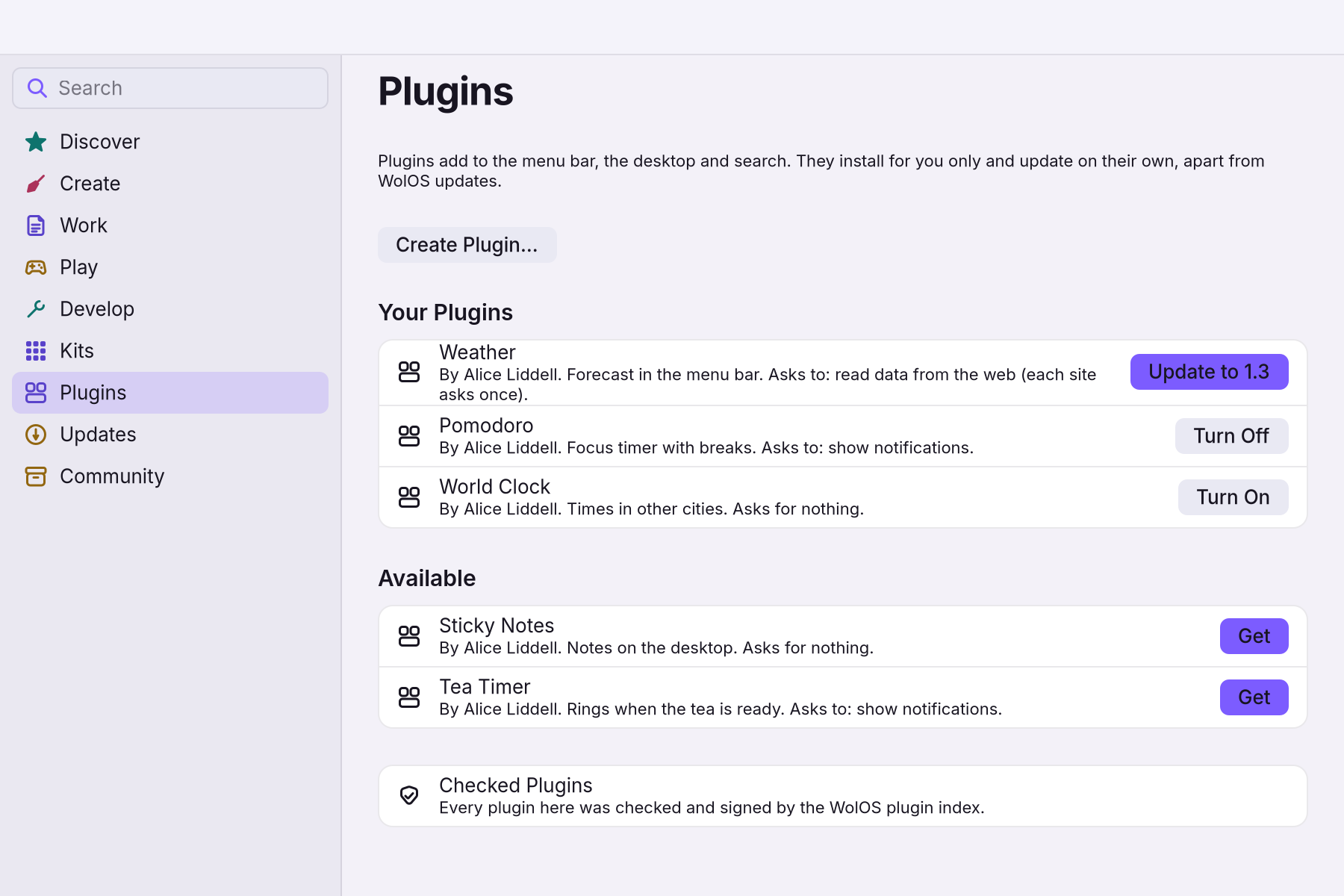
Find ready-made plugins in the Store under Plugins: each row says what it does and what it asks for, with Get, Turn On or Update.
- To write your own, start with
wol plugin new <id>(or Create Plugin in the Store, which opens Plugin Maker), edit, thenwol plugin check <id>until it passes. - See it with
wol plugin run, which shows what it draws, andwol plugin enableto put it on your desktop. It gets only the permissions its manifest lists.
If something goes wrong
| What you see | What to do |
|---|---|
wol plugin check fails | Read each problem: manifest, id, files named, symlinks, size (1 MiB), Lua that does not load or render, theme contrast. check also refuses the look and hypr sections. |
| A plugin keeps failing | It is turned off after three failures in a row. Fix it and run wol plugin enable <id>. |
| An action does nothing | An exec that is not a wol verb needs the run permission, and tiles, Dock items and shortcuts run commands only after you allow it. |
wol plugin add cannot find an id | It takes a folder or a .wolplug file; adding by id works only in the Store. |
| The id is refused | The org.wolos prefix is reserved for plugins WolOS ships. |
| A web request fails | A plugin's web requests cannot be redirected to another host. |
| Too many notifications | Plugin notifications are rate limited. |
Related
Plugin Maker · The Store · Privacy and permissions · The plugins page
Reference
Decision: ADR 0031. Code: crates/shared/src/plugins.rs (manifest contract, parse, the schema), crates/shared/src/layout.rs (bar and Dock slots plugin items land in), crates/wol-lua/src/plugin.rs (Lua API v1 in the widget sandbox), crates/core/src/plugins.rs (folders, check, grants, state, toggles, failure counter, scaffold, pack), crates/controller/src/plugin.rs (wol plugin). Reference plugin: plugins/shell/org.wolos.stats/. Schema: docs/plugins/plugin.schema.json, installed at /usr/share/wolos/plugins.schema.json.
This is the one document for the whole plugin API. Every TOML and Lua block in it is parsed and run by crates/controller/tests/plugin_docs.rs, so what you read here is what the code accepts.
What a plugin is
A plugin is a folder named after its id with a plugin.toml and the files it names. Nothing else: no install hooks, no binaries, no symlinks, at most 1 MiB. The shell looks in ~/.local/share/wolos/plugins/<id>/ (yours, reloaded when it changes) and /usr/share/wolos/plugins/<id>/ (shipped or installed through wopkg). A plugin may contribute, through sections of its manifest: a menu bar item, a Dock entry, a desktop card, a panel, search results, a Control Center tile, a toggle, a hotkey, a web app, a theme, a Looks preset and compositor window rules. Code is Lua, run in the sandbox of ADR 0020 (wol-lua: 16 MiB, 5 million instructions per load, render or click, no io, os, require, debug, loaders or bytecode). A plugin cannot leave the HIG: it returns Kit view trees and the shell draws them. It reaches the system only through the calls below and, for anything that changes the system, through wol verbs, which pass the helper policy and the audit log under the plugin's id (Settings > Assistants & Automation).
Ids are reverse-DNS (org.example.stats) or <user>.<name> (alice.stats): lowercase labels of letters, digits and -, joined by dots. org.wolos.* is reserved for plugins WolOS ships.
The manifest, plugin.toml (schema 1)
schema = 1
id = "alice.stats"
name = "Stats"
version = "1.0"
author = "Alice"
license = "MIT"
description = "CPU and memory in the menu bar, with a desktop card."
min_wolos = "0.12"
permissions = ["run"]

[[menubar]]
id = "bar"
script = "bar.lua"
side = "right"

[[widget]]
id = "card"
script = "card.lua"
sizes = ["small", "medium"]

[[hotkey]]
id = "top"
default = "super+shift+t"
exec = ["foot", "-e", "btop"]
group = "Stats"
Header keys, in this order:
| Key | Required | Meaning |
|---|---|---|
schema | yes | 1. A newer number is refused with a sentence. |
id | yes | The plugin id; also the folder name. |
name | yes | One line, up to 40 characters. |
version | yes | Letters, digits and . _ + ~ -, like "1.0". |
author | no | One line, up to 40 characters. |
license | yes | An SPDX id, like "MIT" or "GPL-2.0-or-later". |
description | no | One line, up to 120 characters. |
min_wolos | no | Lowest WolOS version with every API the plugin uses, like "0.12". |
permissions | no | Any of notifications, run, http, clipboard, open, toggles (below). |
Then one [[section]] per contribution. Every entry has an id (1 to 32 lowercase letters, digits, -, _), unique across the whole plugin; the shell refers to it as <plugin id>/<entry id>. Unknown keys and unknown sections are load errors, each a sentence naming the place ([[menubar]] 1: unknown key "colour"; it takes id, script, side.). Files are relative paths inside the folder, no .., no hidden names.
| Section | Keys | Notes |
|---|---|---|
[[menubar]] | script, side | A bar item. side is left, centre or right (default). The script returns wol.menubar. |
[[dock]] | name, icon, exec | A Dock tile that runs exec (argv, never a shell line). An exec that is not a wol verb needs the run permission. |
[[widget]] | script, sizes | A desktop card (today's lua:<id>). sizes: any of small, medium, large (default all). |
[[panel]] | script, anchor | A sheet the shell shows on wol.show("<id>") or a hotkey. anchor: top (default), bottom, left, right, centre. |
[[search]] | script, kind, prefix | Search rows. kind = "results" (default) sees every query; kind = "command" sees queries starting with prefix (1 to 8 characters, no spaces). |
[[tile]] | icon, label, toggle | A Control Center tile bound to a [[toggle]] of this plugin. |
[[toggle]] | on, off | Two argv commands; the state is a flag file in $XDG_STATE_HOME/wolos/toggles/<plugin>.<id>. A command that is not a wol verb needs the run permission. |
[[hotkey]] | default, exec, group | A user-rebindable shortcut (shortcuts::Custom). default: modifiers from super, ctrl, alt, shift, then a key (super+shift+t, super+f5, super+space). group is the heading in Settings (default: the plugin name). An exec that is not a wol verb needs the run permission. |
[[webapp]] | name, url, icon, profile | A frameless browser window for an https:// URL. While the plugin is on it is a launcher next to your own web apps (wol webapp list, Search, Launchpad; pin it to the Dock): ~/.local/share/applications/wolos-webapp-plugin-<plugin>-<id>.desktop, marked X-WolOS-Plugin=<plugin>. Turning the plugin off or removing it removes the launcher; a web app of yours with the same file name is kept. profile: shared (default) or own (isolated cookies). |
[[theme]] | file | A theme.json (shared::theme tokens, optional extends); checked for contrast. |
[[look]] | file | Planned: a Looks preset JSON (wol_core::looks). Nothing applies it yet, so wol plugin check refuses the section and wol plugin new does not offer it. |
[[hypr]] | file | keyword = value lines; only windowrule, layerrule, bezier, animation. Never bind, exec, env, source, plugin, $variables or { } blocks. Planned: nothing applies these lines yet, so wol plugin check refuses the section and wol plugin new does not offer it. When it lands, the lines become hyprprefs keywords, never sourced raw. |
icon is a symbolic icon name or a .png/.svg in the folder.
The rules a [[hypr]] section will be held to (windowrule or layerrule, value
effect [args], match, ...; shared::plugins::check_hypr, already run by check):
windowruleeffects allowed (placement and looks):float,tile,pseudo,size,minsize,maxsize,move,center,workspace,rounding,bordersize,animation,opacity,idleinhibit. Effects that take windows away from the person (nofocus,noinitialfocus,fullscreen,maximize,pin,stayfocused,suppressevent,dimaround,nodimand anything else not listed) are refused.layerruleeffects allowed (the plugin's own surfaces):blur,blurpopups,ignorezero,ignorealpha,animation. Notxray,noanimordimaround.opacitymay not go below 0.5 (HYPR_MIN_OPACITY): from 0.5 to 1.- Every rule needs at least one match that names something, like
class:^(org.example.App)$; a match every window passes (.*,class:.*,title:^(.+)$) is refused.
A plugin with everything:
schema = 1
id = "alice.everything"
name = "Everything"
version = "0.3"
license = "GPL-2.0-or-later"
permissions = ["notifications", "run", "http", "clipboard", "open", "toggles"]

[[menubar]]
id = "bar"
script = "bar.lua"

[[dock]]
id = "launch"
name = "Terminal"
icon = "utilities-terminal-symbolic"
exec = ["foot"]

[[widget]]
id = "card"
script = "card.lua"

[[panel]]
id = "sheet"
script = "sheet.lua"
anchor = "centre"

[[search]]
id = "calc"
script = "calc.lua"
kind = "command"
prefix = "="

[[toggle]]
id = "awake"
on = ["wol", "power", "awake", "on"]
off = ["wol", "power", "awake", "off"]

[[tile]]
id = "awake-tile"
icon = "weather-clear-symbolic"
label = "Stay Awake"
toggle = "awake"

[[hotkey]]
id = "sheet-key"
default = "super+shift+e"
exec = ["wol", "shell", "show", "control-center"]

[[webapp]]
id = "mail"
name = "Mail"
url = "https://mail.example.com/"
icon = "mail-unread-symbolic"
profile = "own"

[[theme]]
id = "night"
file = "night.json"
A plugin without code: a Control Center tile bound to a toggle, and a theme.
schema = 1
id = "alice.quiet"
name = "Quiet"
version = "1.0"
license = "MIT"
description = "A Silence tile and a dark theme."

[[toggle]]
id = "silence"
on = ["wol", "focus", "on"]
off = ["wol", "focus", "off"]

[[tile]]
id = "silence-tile"
icon = "notifications-disabled-symbolic"
label = "Silence"
toggle = "silence"

[[theme]]
id = "night"
file = "night.json"
The TOML subset: key = value lines, "strings" with \" \\ \n \t \uXXXX, 'literal strings', whole numbers, true/false, [lists] (may span lines, trailing comma allowed), [[sections]] and # comments. Dotted keys, inline tables, multi-line strings, floats and dates are refused with a sentence.
Permissions
Declared in the header, shown before the plugin is turned on (wol plugin enable; in the Store, the "Asks to:" line of the plugin's row, which wopkg checks against the package's own manifest before it installs anything: a list entry that names other permissions than the signed package is refused), stored per plugin in $XDG_CONFIG_HOME/wolos/plugins.json and revocable in Settings. A plugin that is on but whose newer manifest asks for more shows "needs a new grant" in wol plugin list until it is enabled again; in the Store its row says what is new ("Asks for more now: ...") with an Allow button that runs the same wol plugin enable, so an update never leaves a permission silently refused. Without the permission the call does not exist (wol.run == nil), so a script can test for it.
| Permission | Call | Shown as |
|---|---|---|
notifications | wol.notify | Show notifications |
run | wol.run; [[toggle]], [[dock]] and [[hotkey]] commands that are not wol verbs | Run commands as you |
http | wol.http_get | Read data from the web (each site asks once) |
clipboard | wol.clipboard.text | Read the clipboard |
open | wol.open | Open apps, files and links |
toggles | wol.toggle_set | Switch its own toggles |
wol.run { "wol", ... } runs the wol verb as a helper named after the plugin: the helper policy, on-screen approval and the audit log apply exactly as for an AI assistant (docs/modules/automation.md). Other programs run as you, with the limits of widget sources (own process group, CPU limit, nice 10, output cap, never a shell). The argv of [[toggle]], [[dock]] and [[hotkey]] entries are commands too: one whose first word is not wol is refused by check unless the plugin declares run, and the shell runs, shows or binds it only while run is granted. wol plugin check and wol plugin enable list each such command. wol.http_get needs a grant for each host; the first use shows the consent sentence ("Allow this plugin to read data from api.example.com.") and the card asks. A read follows no redirect: a host that answers with one (to another site, the local network or this machine) gives an error, never the other body. wol.notify posts at most 10 notifications a minute per script (the rest answer false, message); titles are cut at 120 characters and bodies at 1000. No new privilege path exists: a plugin that needs more is a libwol app (ADR 0020).
Lua API v1
A script is one file that ends with return wol.<kind> { ... } matching its section. Loading a script never acts: the service calls are added after the file has run, so only render, popover, query and handlers reach them. Every service call returns ok, message (or value, message) instead of raising.
Scripts
| Returns | Fields |
|---|---|
wol.menubar { refresh, render, popover } | render() is the bar item (a label, an image, a small row); popover() (optional) is shown when the item is clicked. |
wol.widget { refresh, render } | A desktop card; render() returns the card body. |
wol.panel { title, render } | A sheet; render() returns its body. |
wol.search { query } | query(text) returns up to 20 rows { title, subtitle, icon, on_activate }; a command entry gets the text after its prefix. |
refresh: seconds between renders, 0 to 86400 (default 60; 0 = only after input). After a handler runs, the shell renders again.
-- bar.lua: CPU and memory from `wol sys stats --json` (permission "run").
local cpu, mem, err = 0, 0, nil
local function read()
  local ok, out = wol.run { "wol", "sys", "stats", "--json", timeout = 5 }
  if not ok then err = out; return end
  local v, e = wol.json.decode(out)
  if not v then err = e; return end
  err = nil
  cpu = math.floor((v.cpu_percent or 0) + 0.5)
  local total, used = (v.memory and v.memory.total) or 0, (v.memory and v.memory.used) or 0
  mem = total > 0 and math.floor(used * 100 / total + 0.5) or 0
end
return wol.menubar {
  refresh = 5,
  render = function()
    read()
    if err then return wol.label { "Stats: -" } end
    return wol.row { spacing = 8, wol.label { "CPU " .. cpu .. "%" }, wol.label { "MEM " .. mem .. "%" } }
  end,
  popover = function()
    return wol.stack { spacing = 8,
      wol.label { "Stats", role = "title" },
      wol.label { err or ("CPU " .. cpu .. "%, memory " .. mem .. "%"), role = "secondary" },
      wol.button { label = "Open Top", on_click = function() wol.run { "foot", "-e", "btop" } end },
    }
  end,
}
Parts (the view tree)
| Part | Draws |
|---|---|
wol.stack { spacing = 8, a, b, ... } | Children top to bottom. spacing: 0, 4, 8, 12, 16 or 24. |
wol.row { spacing = 8, a, b, ... } | Children left to right. |
wol.list { a, b, ... } | Rows with separators. |
wol.item { title = "", subtitle = "", icon = "", size = 24, button = { label = "", on_click = f } } | A list row: icon, title over subtitle, optional trailing button. |
wol.label { "text", role = "body" } | Text. Roles: display, large, title, body, secondary, caption. |
wol.button { label = "Go", on_click = function() end } | A button; on_click is required. |
wol.spacer() | Pushes what follows to the far side. |
wol.image { "icon.png", size = 24 } | A symbolic icon name, or an image file in the plugin folder. Sizes: 16, 24, 32, 48, 64, 96, 128. |
wol.toggle { label = "Wi-Fi", on = true, on_change = function(on) end } | A switch. |
wol.slider { value = 50, min = 0, max = 100, on_change = function(v) end } | A slider. |
wol.text_field { text = "", placeholder = "Search", on_change = function(text) end } | One line of text. |
Limits (shared::view): 12 levels deep, 200 parts, text up to 1024 bytes. Interactive parts are numbered in tree order in the printed JSON; wol plugin run ... <n> clicks part n.
-- sheet.lua: every part once (a panel).
local on, level, name = true, 40, ""
return wol.panel {
  title = "Everything",
  render = function()
    return wol.stack { spacing = 12,
      wol.row { spacing = 8, wol.image { "emblem-default-symbolic", size = 32 }, wol.label { "Everything", role = "title" }, wol.spacer(),
        wol.button { label = "Close", on_click = function() end } },
      wol.list {
        wol.item { title = "First", subtitle = "A row", icon = "folder-symbolic" },
        wol.item { title = "Second", button = { label = "Open", on_click = function() wol.show("control-center") end } },
      },
      wol.toggle { label = "Enabled", on = on, on_change = function(v) on = v end },
      wol.slider { value = level, min = 0, max = 100, on_change = function(v) level = v end },
      wol.text_field { text = name, placeholder = "Your name", on_change = function(t) name = t end },
      wol.label { "Caption", role = "caption" },
    }
  end,
}
Services
Always present:
| Call | Returns |
|---|---|
wol.now() | { year, month, day, weekday (1 = Monday), hour, minute, second } |
wol.system() | { os_name, os_version, kernel, appearance ("light" or "dark"), accent, accent_rgb } |
wol.json.decode(text) | value, message: JSON text (up to 256 KB) as Lua tables, or nil and why. |
wol.json.encode(value) | text, message: strings, numbers, booleans, lists and string-keyed tables. |
wol.state.get(key) | The saved value (any JSON value) or nil. State is per plugin, a JSON object of at most 64 KB in $XDG_STATE_HOME/wolos/plugins/<id>/state.json, the only place a plugin writes. |
wol.state.set(key, value) | ok, message. nil removes the key. Saved at once. |
wol.toggle_get(id) | true when this plugin's toggle id is on. |
wol.show(panel) | ok, message. A shell panel (control-center, notifications, switcher, session, clipboard, osd, ...) or one of this plugin's [[panel]] ids. |
With a permission:
| Call | Permission | Returns |
|---|---|---|
wol.notify(title, body) | notifications | ok, message. At most 10 a minute per script. |
wol.run { "prog", "arg", ..., timeout = 5 } | run | ok, output_or_message. argv only; timeout 1 to 30 s (default 5); stdout up to 64 KB. |
wol.http_get(url) | http | body, message. https:// or http://; the host needs a grant; redirects are refused. |
wol.open(target) | open | ok, message. A file, folder, link or app id, with the default handler. |
wol.toggle_set(id, on) | toggles | ok, message. Flips this plugin's toggle id and runs its on/off command. |
wol.clipboard.text() | clipboard | text, message |
-- card.lua: state, JSON and the web (permissions "http" and "notifications").
-- Loading never acts: wol.state and the other services exist from the first render on.
local n, quote
return wol.widget {
  refresh = 900,
  render = function()
    n = n or wol.state.get("count") or 0
    quote = quote or wol.state.get("quote")
    local body, e = wol.http_get("https://api.example.com/quote")
    if body then
      local v = wol.json.decode(body)
      if v and v.text then quote = v.text; wol.state.set("quote", quote) end
    end
    return wol.stack { spacing = 8,
      wol.label { quote or e or "...", role = "title" },
      wol.row { spacing = 8,
        wol.label { "Seen " .. n .. " times", role = "secondary" },
        wol.spacer(),
        wol.button { label = "+1", on_click = function()
          n = n + 1
          wol.state.set("count", n)
          if n == 10 then wol.notify("Ten!", "You looked ten times.") end
        end },
      },
    }
  end,
}
-- calc.lua: a command search ("=2+2"). The script gets the text after the prefix.
return wol.search {
query = function(text)
local expr = text:gsub("[^%d%+%-%*/%.%(%) ]", "")
if expr == "" then return {} end
return {
{ title = expr, subtitle = "Copy result", icon = "accessories-calculator-symbolic",
on_activate = function() wol.state.set("last", expr) end },
}
end,
}Failure and limits
A render or click that errors shows the sentence on the card or bar item, not a crash. Three failures in a row turn the plugin off with a toast saying why (wol_core::plugins::Health). A script that runs too long is stopped ("This widget took too long and was stopped."), as is one that uses too much memory.
"Too long" has two bounds (crates/wol-lua/src/lib.rs, Deadlines, INSTRUCTION_BUDGET): 5 million Lua instructions, and a wall-clock deadline per call, 200 ms to load the file, 50 ms per render or popover, 200 ms per click, change or query (the host may set others; the shell uses these, because scripts run on its drawing thread). The clock is read every 250 instructions and before every library call whose time grows with its input (string.rep, find, match, gmatch, gsub, upper, lower, reverse, sub, format, byte, char, pack, unpack, table.move, concat, insert, remove, sort, unpack, utf8.*), so a loop around such a call stops at the deadline even inside pcall. Those calls are also capped one by one: string.rep at 2^20 repeats and 1 MiB of result (an empty string repeated 2^40 times is refused), table.move and table.concat at 2^20 items, table.insert/remove at 2^20 items and table.sort at 2^16 (lengths read through __len, as Lua's C code reads them), pattern subjects at 1 MiB. A script stopped for time stays stopped: every later render, click or query answers the same sentence without running it, until the file changes and is loaded again. To wol_core::plugins::Health that answer is a failure like any other, so a host that counts failures turns a stopped plugin off after three.
wol plugin
| Command | Does |
|---|---|
wol plugin new <id> [kinds] | Scaffolds ~/.local/share/wolos/plugins/<id>/ with one entry per kind (comma-separated: menubar,widget,panel,search,dock,tile,toggle,hotkey,webapp,theme; default menubar,widget; look and hypr are planned and refused). The result passes check. |
wol plugin check <id or folder> [--json] | Manifest, folder (files named exist, no symlinks, 1 MiB), every Lua script loaded and rendered once with inert services, the same as Plugin Maker's check (search: one query): wol.run, wol.http_get, state and toggles answer empty and nothing runs, is read from the web or is written, because the plugin was granted nothing. Theme contrast; planned sections ([[look]], [[hypr]]) are refused. Exit 0 only when clean; the OK line lists the permissions and every command the plugin runs as you. new and pack run the same check. |
wol plugin run <id or folder> <menubar|widget|panel|search> [entry] [input] | Runs one entry headless with real services, as you (its wol.run commands run and its state is written; this is the author's tool, so run only a plugin you trust) and prints JSON: node (and popover), refresh, events (notifications, run, open, show as lines). input is a part number to click before the final render, or the search text. XDG_STATE_HOME=/tmp/x gives a clean state; WOL_PLUGIN_HOSTS=a.com,b.com grants hosts for http_get. |
wol plugin list [--json] | Installed plugins: on/off, version, entries, problems. |
wol plugin add <folder or file.wolplug> [--yes] | Installs a plugin for this account the way the Store's Plugins page does: the .wolplug is unpacked (bounded) and checked like a Store download (signature, hashes, folder rules), then staged, checked and moved into ~/.local/share/wolos/plugins/<id>/. Unsigned (every folder, a .wolplug the index did not sign) needs --yes. It does not turn the plugin on. Plugins by id come from App Store > Plugins. |
wol plugin enable <id> / disable <id> | Turns a plugin on (granting what it declares) or off, and adds or removes its [[webapp]] launchers; the running shell reloads. |
wol plugin remove <id> | Deletes a user plugin folder, its state and its web app launchers. System plugins are only disabled. |
wol plugin pack <id or folder> [out] | Writes <id>-<version>.wolplug after a clean check. |
--json on any command gives machine-readable output; without a TTY it is the default.
How an AI agent writes and tests a plugin in 5 steps
wol plugin new alice.weather menubar,widgetmakes a folder that already passes check. Read/usr/share/wolos/plugins.schema.json(the manifest schema) and this page.- Edit
plugin.toml(name, description, permissions, entries) and the.luafiles. Keep scripts small: oneread()that fetches data, onerender()that returns parts. wol plugin check alice.weather --jsonuntil"valid": true. Every problem is one sentence naming the file or[[section]] nand what to change.wol plugin run alice.weather menubar --jsonprints the view tree;wol plugin run alice.weather widget card 1 --jsonclicks part 1 first and shows the new tree and theeventsthe handler caused. UseXDG_STATE_HOME=$(mktemp -d)for a clean state andWOL_PLUGIN_HOSTS=api.example.comwhen the plugin reads the web.wol plugin enable alice.weatherto see it on the desktop;wol plugin pack alice.weatherto make the.wolplugto share.
Distribution
Three ways in, all user level, none waiting for an OS release (ADR 0031): drop the folder in ~/.local/share/wolos/plugins/; wol plugin add <folder|.wolplug> (stage, check, move; hooks never run); or the signed plugin index through the Store's Plugins page, which also offers updates. The Store installs only what the index lists and signs (a download that is not signed, or does not match its entry, is refused; there is no unsigned path and no confirmation for it there). Unsigned plugins (a folder, or a .wolplug the index did not sign) are marked unreviewed, like community-collection packages, and need --yes on wol plugin add; a .wolplug file has no double-click handler, so a downloaded package is added from a terminal. A plugin that needs a newer WolOS than the running one (min_wolos) is listed as "Needs WolOS x" and not offered; an installed one keeps working and keeps its switch while the newer version waits. Plugin updates are found in the background: the desktop checks the plugin list about once an hour (the verified cache; a download only when the cache is missing, expired or stale, and only when a plugin is installed) and shows one notification per new version, not only when the Store page is open. Planned, not in 0.12: wol plugin add by index id or git URL, and wopkg update updating plugins.
.wolplug (frozen): a zstd-compressed ustar archive with the members <id>/<file> for every file of the folder, then SHA256 (BSD sha256 lines, one per file, sorted, ADR 0011 form), then optionally SHA256.sig (the raw 64-byte Ed25519 signature of the SHA256 bytes, by the index key in /usr/share/wolos/keys/). wol plugin pack writes it unsigned; the index CI adds the signature. File paths inside are at most 99 characters.
Where things live
| What | Where |
|---|---|
| User plugins | $XDG_DATA_HOME/wolos/plugins/<id>/ (default ~/.local/share/...) |
| System plugins | /usr/share/wolos/plugins/<id>/ |
| On/off and grants | $XDG_CONFIG_HOME/wolos/plugins.json |
| Plugin state | $XDG_STATE_HOME/wolos/plugins/<id>/state.json |
| Toggle flags | $XDG_STATE_HOME/wolos/toggles/<plugin>.<toggle> |
| Schema | /usr/share/wolos/plugins.schema.json |
| Bar and Dock slots | shared::layout::Layout in shell.json: BarItem::Plugin { plugin, id }, DockItem::Plugin { plugin, id } |
Related
- 0031: Plugins, themes and layoutsFolder plugins in a sandbox, themes for every toolkit, and layouts as data.
- Plugin Maker and Theme StudioMake a plugin or a theme and see it live in a sandbox, then package it for the plugin index.
- The wol commandEvery wol command, what it does, and which ones helpers may call.
- Assistants and automationScripts and AI helpers act through the same `wol` commands as people, behind an approval gate.
- Optional modulesAI, developer, creative and console stacks, installed after the base and removable.
From the developer documentation, wonderlandos/wolos docs/modules/plugins.md.